Turn TikTok Comments into AI Avatar Videos with Dumpling AI, GPT-4 & Captions.ai
Overview
This workflow transforms TikTok video comments into fully edited AI avatar videos automatically. By combining Dumpling AI, GPT-4, Captions.ai, Submagic, and Airtable, this system takes care of script writing, video generation, enhancement, and storage without manual editing.
Key Benefits
- Automate script creation using real TikTok comments and transcripts, turning user engagement into content ideas.
- Generate avatar videos at scale without hiring voice actors or editors.
- Enhance videos with subtitles and b-roll automatically using Submagic.
- Keep everything organized by storing the final video details in Airtable for easy access and tracking.
- Perfect for creators, social media teams, and agencies looking to repurpose engagement data into daily content.
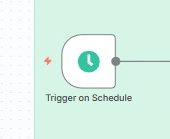
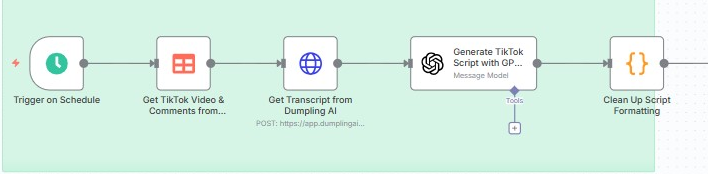
Step 1: Scheduled Trigger
The workflow starts with a Schedule Trigger. You can set this to run daily, weekly, or at any custom interval to automatically fetch new TikTok videos and comments.
Why this matters: This ensures your content pipeline keeps running consistently without manual starts.
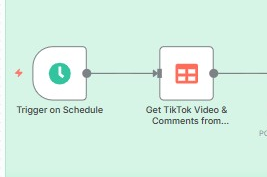
Step 2: Retrieve TikTok Videos and Comments
The Data Table Node fetches TikTok videos and their top comments from a stored database.
It filters the records to ensure only entries with keywords are pulled.
Configuration details:
- Operation: Get
- Filters: Keywords must not be empty
Why this matters: This step supplies the workflow with the content base — a video and a comment that will inspire the script.
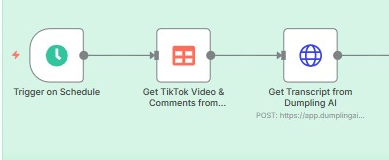
Step 3: Get Transcript from Dumpling AI
The HTTP Request Node sends the TikTok video URL to Dumpling AI to retrieve the full transcript.
This transcript is crucial for GPT-4 to understand the original video context before writing the script.
Why this matters: Combining both transcript and comment allows GPT-4 to generate more relevant, engaging scripts.
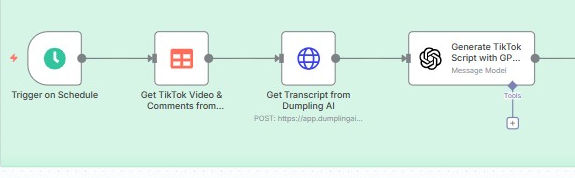
Step 4: Generate TikTok Script with GPT-4
Using the OpenAI Node with GPT-4, the workflow passes both the transcript and the top comment. GPT-4 is prompted to write a natural, attention-grabbing TikTok script that can be read word for word.
Why this matters: GPT-4 uses the video’s real engagement data to create authentic scripts that resonate with the audience.
Step 5: Clean Up Script Formatting
A Code Node runs a JavaScript snippet to clean up the GPT-4 output by removing unnecessary line breaks and extra spaces.
This ensures the script is clean and ready for video generation.
Why this matters: Clean formatting prevents errors when sending the script to Captions.ai and keeps the output professional.
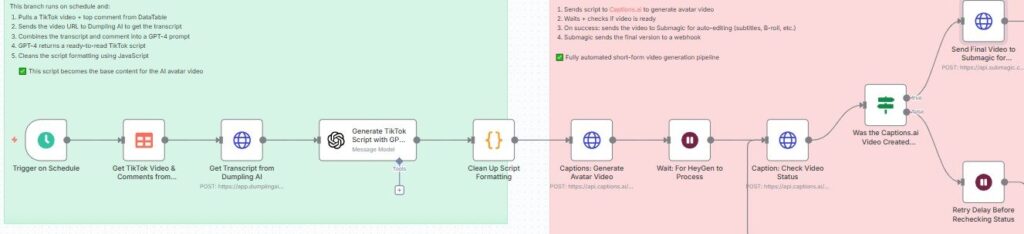
Step 6: Generate AI Avatar Video with Captions.ai
The HTTP Request Node sends the cleaned script to Captions.ai to create a talking AI avatar video.
The creator name is preconfigured to define the avatar voice and style.
Why this matters: Captions.ai handles the video generation automatically, turning text scripts into real videos.

Step 7: Wait and Check Video Status
After submitting the script, the workflow uses a Wait Node and then an HTTP Request to poll Captions.ai for the video status.
If the video is successfully created, it proceeds to enhancement. If not, the workflow retries after a short delay.
Why this matters: This ensures the workflow doesn’t break or publish incomplete videos.

Step 8: Send Final Video to Submagic for Enhancements
Once the video is ready, it’s sent to Submagic for automatic enhancement.
Submagic adds subtitles, b-roll, and zoom effects to make the video more engaging and polished.
Why this matters: Enhanced videos grab more attention on social media and save you editing time.
Step 9: Receive Enhanced Video via Webhook
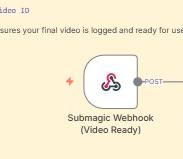
Submagic returns the final video to an n8n Webhook once processing is complete.
The webhook captures the video URL and metadata.
Why this matters: This closes the loop, bringing the improved content back into your system automatically.
Step 10: Save Final Video to Airtable
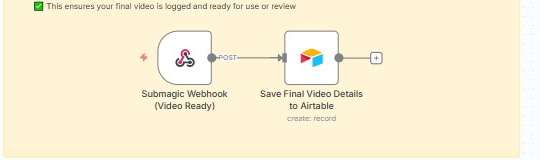
The last step uses an Airtable Node to log the video details.
It saves fields like:
- Final video URL
- Caption Video ID
Why this matters: This gives you a structured archive of all generated content, making it easy to review, share, or post later.
Tools and Accounts Needed
- Dumpling AI API for transcripts
- OpenAI GPT-4 for script generation
- Captions.ai for avatar video creation
- Submagic for automatic editing
- Airtable for storing final outputs
Conclusion
This workflow is a powerful system for turning TikTok engagement into daily content automatically. It handles everything from idea extraction to video generation, editing, and storage with zero manual steps.
Best Use Cases
- Creators who want to scale TikTok content effortlessly
- Agencies managing multiple client accounts
- Brands that want to engage audiences using their own community comments
- Teams that want to keep their content calendar full without burning out
By setting this up once, you build a self-running content machine that turns conversations into videos daily.
Download the blueprint used in this blog post
Click here to access the blueprint.


